Federal Deposit Insurance Corporation - FDIC-Insured - Backed by the full faith and credit of the U.S. Government


Federal Deposit Insurance Corporation - FDIC-Insured - Backed by the full faith and credit of the U.S. Government
Remote check deposit allows you to deposit your checks when and where it’s convenient for you, evenings and weekends included. While we love to see you come into our bank, we know you’re busy and we want to help make your life easier. There are two options to give you flexibility, and both are fast and secure.
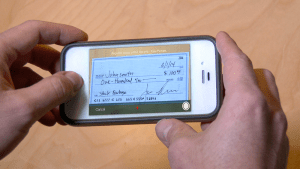
Mobile Check Deposit allows you to deposit checks from your smartphone or tablet with our Business Banking App.
Simply snap a picture of both sides of the check and the mobile app sends the check to the bank. This process uses high-level encryption to secure your data and protect you.
Deposit checks anywhere, anytime, with Mobile Check Deposit from The Callaway Bank.
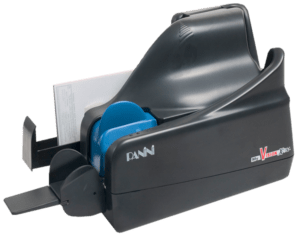
eDeposit is suited for businesses that have a higher volume of checks. eDeposit uses a small desktop scanner that can process up to 90 checks per second. We have lower volume scanners that are great for processing a handful of checks at a time.
This technology works through our Business Online Banking portal. You deposit checks from your own office and receive a credit to your account just as if you visited our lobby.
Gain Efficiency:
This system scans your checks, creates the deposit ticket, and sends them securely to the bank for processing. It also archives the check images which eliminates the step of copying checks for your files. Deposits can be made up to 5 p.m. for same-day credit. The system also provides full research access to past payments.
There is a small monthly fee for this service that easily covers the time and resources you used to spend on processing your deposit.
Contact Our Business Banking Team
Learn how The Callaway Bank can be your partner for all your Business Banking needs. We can help you grow, become more efficient, or simply get started.
Learn Moreabout Business BankingBusiness Mobile App with Mobile Check Deposit is here! The Callaway Bank Business Mobile app allows you to bank on the go. It’s free to download and offers quick access for managing your business accounts. Check your balances, pay bills, transfer money, locate ATMs and banking centers with just a touch*. Our native app is fast, secure […]
Learn Moreabout Business Mobile AppBusiness Digital Banking lets you manage many aspects of your banking relationship from wherever you are anytime. Business Digital Banking is free, secure, and available to you 24/7.
Learn Moreabout Business Digital BankingDeposit checks anywhere, anytime with Mobile Check Deposit from The Callaway Bank.
Learn Moreabout Personal Mobile Check DepositDeposits within the parameters below are typically approved within minutes. Consumer, Prepaid, and Business accounts have an automatic limit set at $3,000 with a maximum deposit up to $5,000 with approval.
Mobile check deposit is available on Android™ mobile phones, Apple iPhones® and iPads™, and Amazon Kindle™ devices.
Deposits made before 5:00 pm Central Time on a Business Day that we’re open will be available the next business day. Deposits made after 5:00 pm Central Time on a Business Day that we’re open will be available the second business day.
Yes. You enroll one account initially. Once your enrollment is approved, you can add additional accounts by calling our Customer Care Team at 573.642.3322 Monday – Friday 7:00 a.m. – 1:00 a.m.; Saturday 8:00 a.m. – 2:00 p.m.
We use multiple layers security technology and advanced encryption to ensure your information is protected through a secure connection to the bank. Additionally, neither your check images nor your banking information is ever stored on your device.
Below you’ll find a more detailed outline of the security measures used to protect you:
While security measures are in place, there are several practices you can utilize to further protect yourself.
Checking, Savings, Prepaid, and Money Market accounts.
After you receive confirmation that we have received your check image retain the check for at least 30 calendar days, then destroy it.
It’s free to our checking and prepaid clients!
We require it to be your signature with “For Mobile Deposit Only” under your name. This helps you identify which checks were deposited via your mobile device and prevents accidentally depositing the check more than once.
The first thing you’ll see is a pop-up message in the app letting you know your deposit is being reviewed.
App Pop Up Message: “The deposit to ***123 has been received and will be reviewed” (with ***123 being your account number).
Status Update Email: Shortly afterward, you’ll receive a status update via email stating one of the following:
Approved – A message stating that “Check # xxx in the amount of $xx.xx has been approved” will be sent before the end of the business day.
Rejected – A message stating that “Check # xxx in the amount of $xx.xx has been declined” will be sent before the end of the business day.
Duplicate – If a check has already been deposited, the duplicate will be automatically rejected. Expect an email like: “This check was not accepted. It is a duplicate of a previously deposited check. Please contact us at 573.642.3322 for assistance if needed.”
Please note that if your deposit was made after 5:00 pm on a business day you’ll receive the above communications on the following business day.
 Ways to Bank
 Calculators
 Apply For A Loan